
Interviews10 min read86 min video
Started in Softimage. Raised in Maya. Still free.
mGear: Why the Maya Rigging Tool Studios Rely On Is Still Free
Key takeaways
- Miquel Campos didn't create mGear. Jérémie Passerin made the original Gear for Softimage. Miquel took over the Maya version around 2013 and calls himself its foster dad.
- mGear is free because the Barcelona studio where Gear began promised developers that everything built there would be open source. The licence later moved from GPL to MIT.
- There is no registration and no telemetry, so Miquel doesn't know who uses mGear unless people tell him.
- mGear can be used asset centric, but it is built for data centric rigging: serialise the guides, reuse small pieces and rebuild many rigs from one change.
- The latest release is aimed at animators: Anim Picker 2.0, Blocking Ghosts, the Animbits Hub and a rebuilt Spring Manager. A Rig Wizard and per-guide variants are planned for around the end of the year.
If you’ve rigged a character in Maya in the last ten years, there’s a good chance you’ve used mGear. It’s the rigging framework a big part of the industry runs on, and it has always been free.
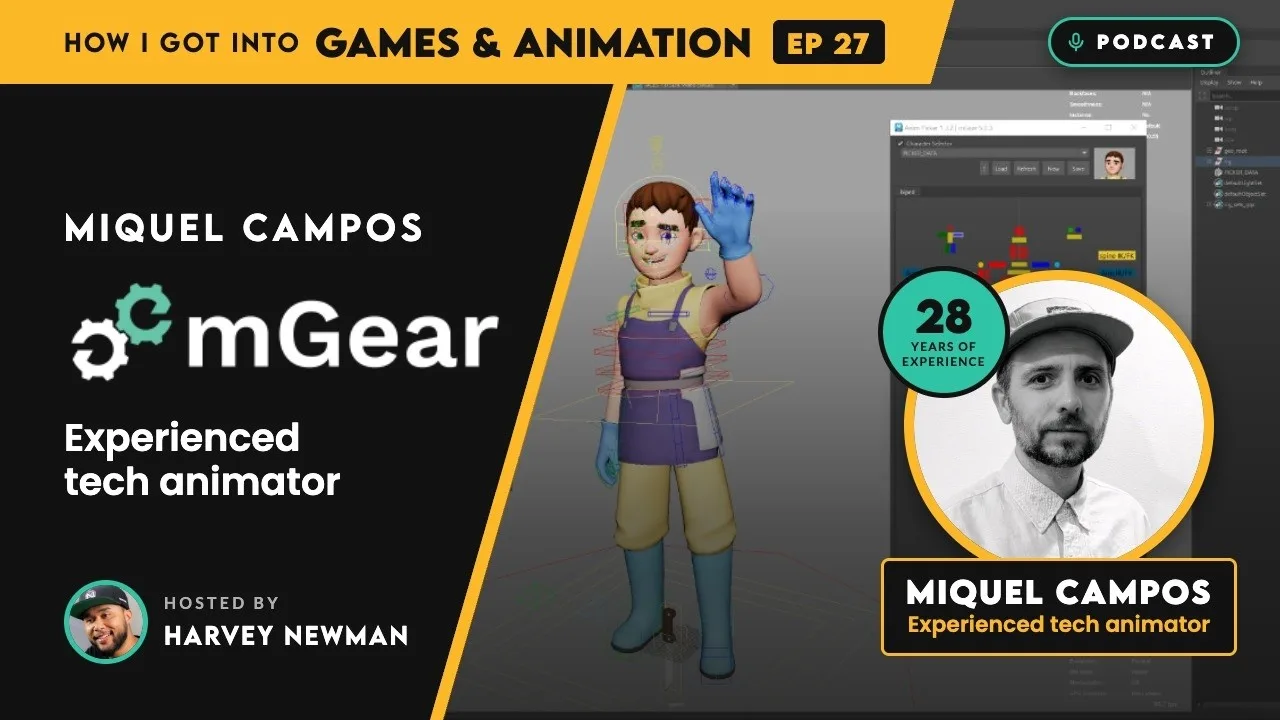
I’ve wanted to talk to Miquel Campos for years, because everyone attaches his name to mGear. So the first thing he did when we sat down was correct me.
“I’m not the original creator of mGear.”
This is my write-up of our conversation for my interview series, How I Got Into Games and Animation: where mGear came from, why it’s still free, how Miquel thinks about rigging in Maya at scale, and the new tools he showed me, a couple of which haven’t been seen in public before.
Who created mGear?
mGear started as Gear for Softimage, written by Jérémie Passerin, who was Miquel’s supervisor at the time. Miquel made a fork of it while working in Montreal. Jérémie started a Maya version, mGear, while waiting for a visa, then dropped it when he joined Blur Studio, which worked in Softimage. It never got past an alpha. Around 2013 Miquel asked Jérémie if he could take it over and change the licence. Jérémie was the only other person who had ever touched the code, and he agreed.
“So, I’m the foster dad.”
Miquel was clear that the credit for starting it belongs to Jérémie. He still keeps in touch with him, and he also calls mGear a community project, because many contributors have sent pull requests over the years.

He also cleared up the name, which he didn’t know himself for years. Gear isn’t the cog. Jérémie told him it’s an acronym: Get Everything Animation and Rigging. And the m?
“It’s Maya gear.”
He used to ride bikes as a teenager, so he kept the theme going: Shifter’s icon is a gear shifter and Crank’s is a bicycle crank.
From photography to the worst animator in the room
Miquel studied filmmaking and photography, but never worked as a cameraman or photographer. He’s a self-described geek, got hold of demo 3D software in the mid 90s, learned from books and got hooked.
His first job was at a studio in Valencia doing ink and paint on a 2D series, Captain Pugwash. In 2000 he moved to Barcelona to work on what he thinks was one of the first 3D TV series made in Spain. Everyone was a generalist, and he doesn’t sugar-coat where he stood.
“I was the worst animator there.”
Being the technical one, he ended up running the motion capture: an Ascension magnetic suit, a heavy backpack, thick cables to the hands, and FilmBox, before it became MotionBuilder. (FBX comes from FilmBox, if you ever wondered.) You could record 10 to 15 minutes before resetting the machine, and a clinic downstairs kept disrupting the magnetic field. His job was cleaning the noise and stabilising the feet before the data went to the animators, who did the hard work.
From there the move to rigging was gradual. Animation for adverts meant building his own rigs. He went from Softimage 3D to XSI, animated in Maya before he knew how to rig in it, ran his own studio making game cinematics, and spent a year in TV development. Each time a project ended, he went back to rigging, “like bread and butter”, and he has stayed there ever since.
He met Jérémie in Paris, where Jérémie was his supervisor. About a year later, Miquel convinced him to come and supervise a project at a studio in Barcelona, and that’s where Gear began. It didn’t get financed and the studio closed, but the teaser they made opened the door to Canada. Jérémie went to Blur Studio for many years and is now at Epic Games. Miquel found Canada too cold, and he and his wife, who is Japanese, moved to Japan in 2014. He works from home now, mostly for clients overseas.
Why is mGear free?
This is the question I most wanted answered, and the answer goes back to that studio in Barcelona.
To attract strong developers, the studio promised that everything built there would be released as open source. People came because of that deal. Gear was free because of it, and Miquel wanted to keep the promise going. Gear was originally GPL, the same licence as Blender. Around 2012 or 2013, with only him and Jérémie in the code, he asked to move it to something more permissive, and they switched to MIT.
mGear doesn’t take donations directly. If you want to give something, the website points you to Médecins du Monde, a non-profit Jérémie knows people at. Miquel makes his living from services instead: training, custom development, rigging pipeline setup and consulting, plus rigging work with a partner studio in Barcelona when a project has 20 or 30 characters.
Nobody tells him who uses it
This was the bit that surprised me most. mGear lives on GitHub. You don’t register, and there is no telemetry.
I don't know who is using it. I literally don't know.
Miquel Campos
He found out a Sonic game used mGear because CG World magazine in Japan mentioned it, so he bought the issue. Another time he spotted the mGear menu in Maya in a studio’s behind-the-scenes video.
I see it from the other side. I’ve been at so many studios that use mGear, and at the studio I’m helping at right now we use it heavily. When I told the team I was interviewing Miquel, they were excited.
What is mGear? More than Shifter
Miquel calls mGear a framework. Most people mean Shifter when they say mGear, but there’s a lot more in it.
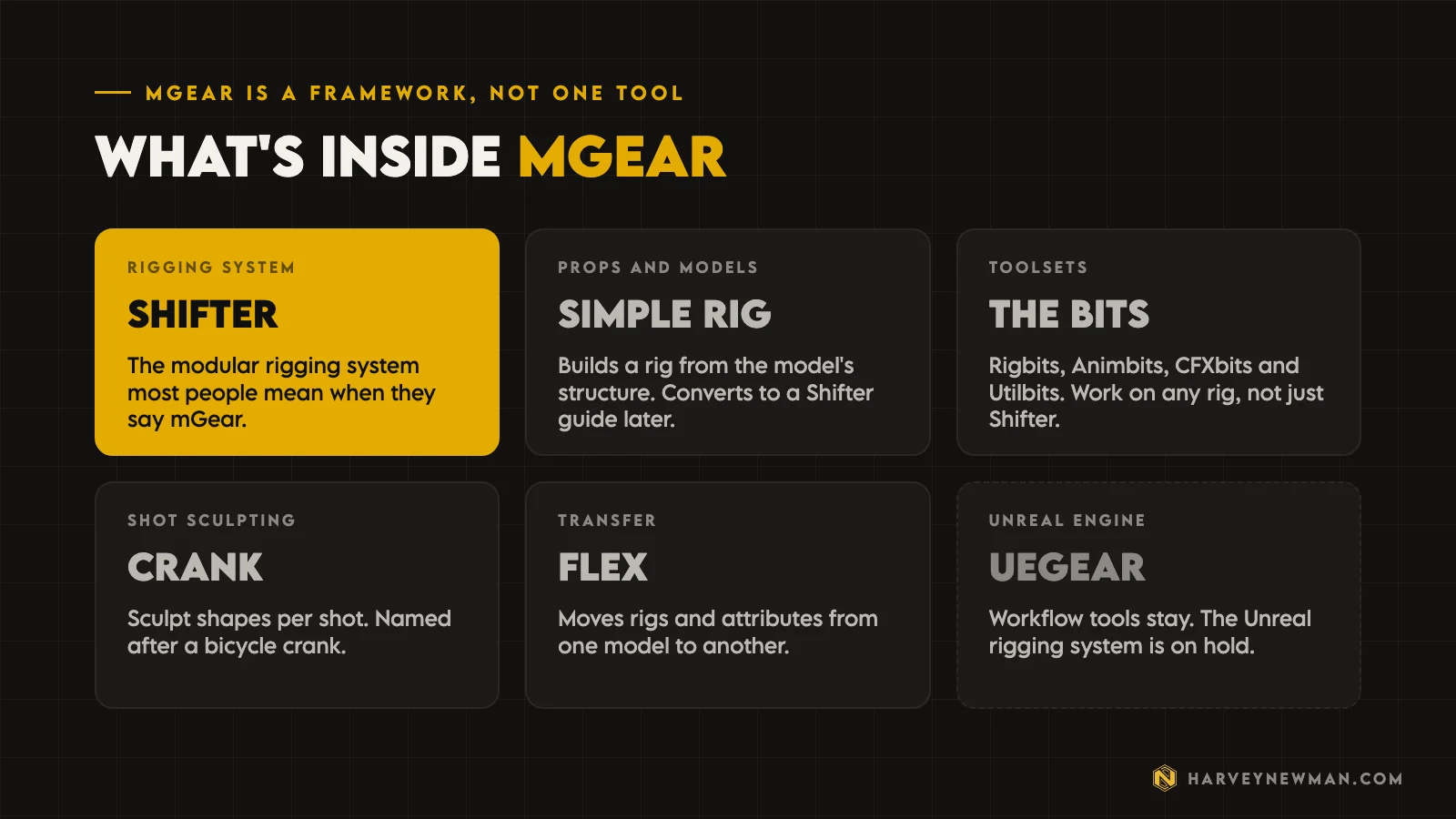
- ShifterThe modular rigging system that builds most mGear rigs from guides.
- Simple RigBuilds a rig for props from the model's structure, and converts to a Shifter guide if you need more.
- The bitsRigbits, Animbits, CFXbits and Utilbits. They work on any rig, not only Shifter rigs.
- ueGearLinks Maya and Unreal. The workflow tools stay. The Unreal rigging system is on hold.
ueGear was the biggest project of the last two years, with Simon as the main engineer. Miquel was honest that the Unreal rigging part didn’t work out: he doesn’t know of any studio using it. He’d like to build future rigging modules on Unreal’s own system. Epic can’t contribute code, but they opened a Slack channel for the team while they were building it.
Asset centric vs data centric rigging
This is where Miquel’s thinking about rigging in Maya gets interesting, especially if you’ve ever had to update a whole cast of Maya rigs late in a project.
Asset centric rigging is what most of us do. Open the scene, place the guides, build, skin, save. Need a change? Open the file and fix it. Rinse and repeat. mGear handles that fine, and for a one-off he said another rigging system might even suit you better.
What he pushes is data centric rigging. He doesn’t claim to have invented it, and says big studios have worked this way for a long time.
“The data is the most important part, not the asset.”
The guide isn’t the source of truth. Underneath, it’s a dictionary that serialises to JSON: “just a descriptor of the instructions”. It builds the same rig whether you build from the guide in the scene or from the saved data, and because the data is in small Lego pieces, you can reuse it.
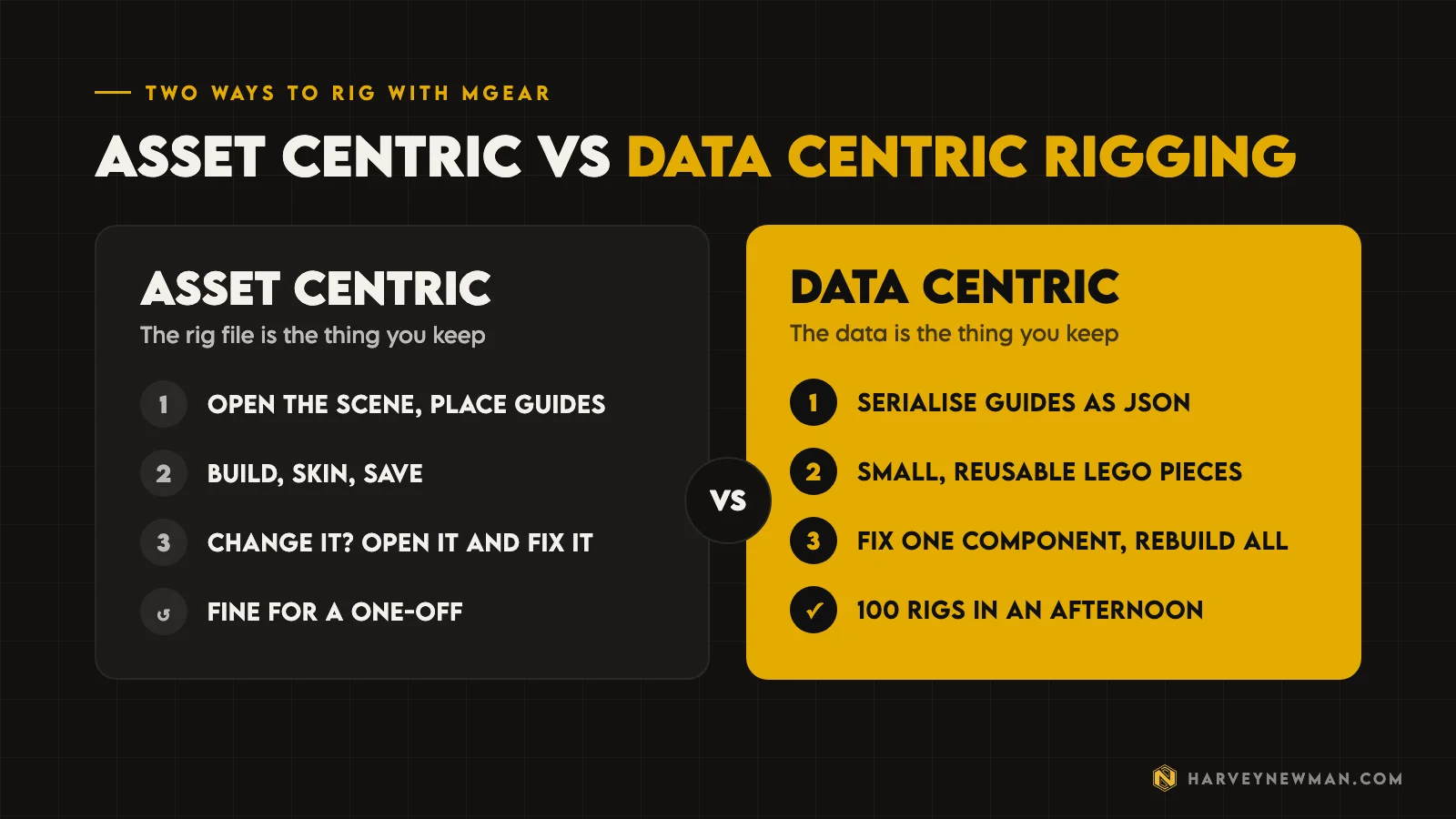
His example: you’re near the end of a game with 100 characters, and you need IK on the fingers that nobody planned. Asset centric, you open 100 files and run a script on each, and some fail. Data centric, you update the one component the fingers use, send the build to the farm, and “you have your 100 assets published in an afternoon”.
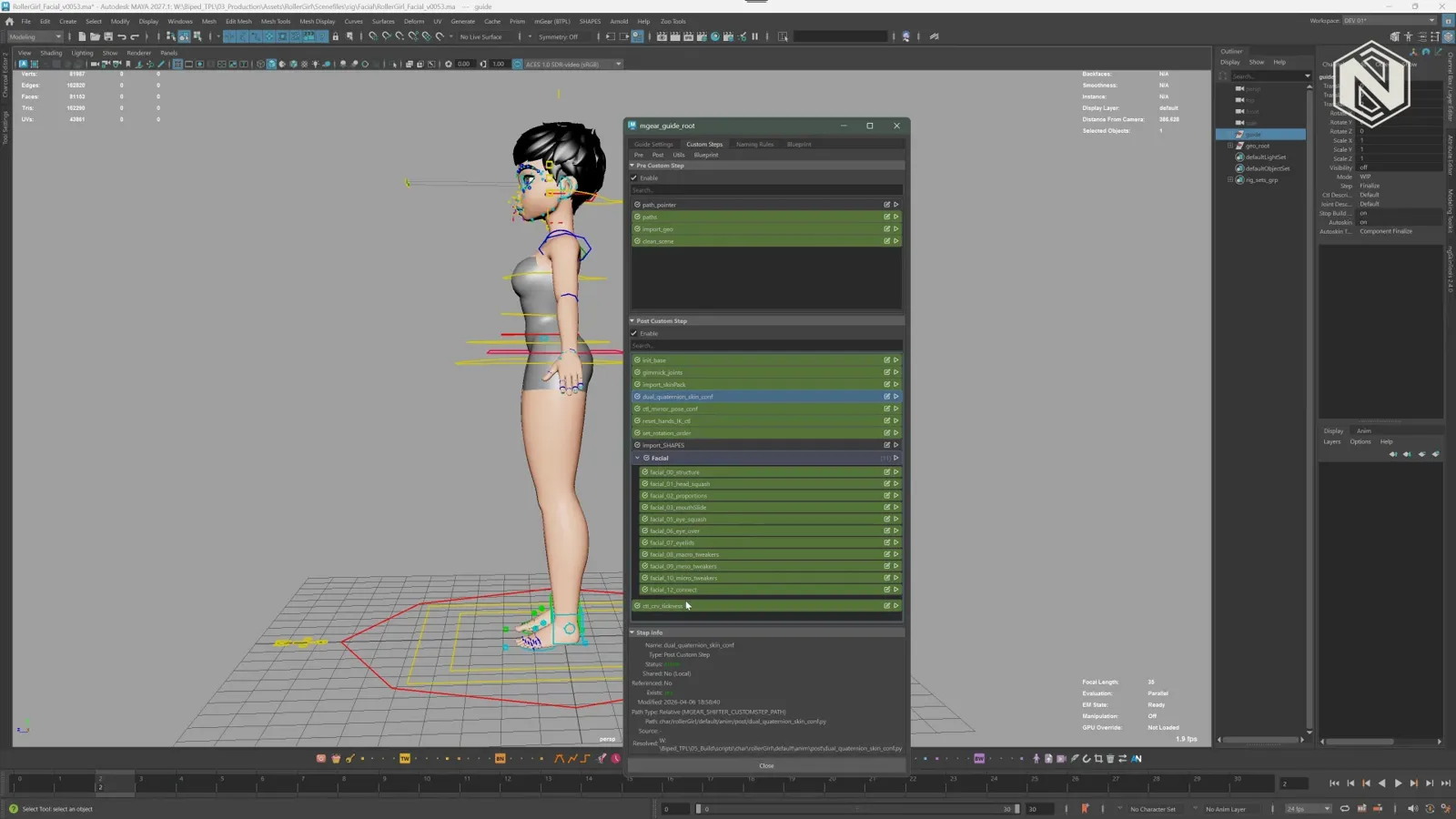
Custom steps are scripts that run before and after the build, and the ones shared across characters show in green. Blueprints go further. A blueprint is just another guide, but other guides inherit its values, custom steps and settings, so a new character only needs its own positions and the parts unique to it, like the cloak and holster on the Nubian rig he showed.
Without that, he said, teams avoid improvements they want because redoing everything by hand costs too much, and “you sacrifice quality and satisfaction of your work”.
I’ve seen the other side of this in inflexible pipelines. Change a rig late and it isn’t only the rigs that break. Animations start breaking too, and that becomes a huge problem. This is why I like the game animation pipeline conversation starting with rigging.
New mGear tools for animators
The latest release is aimed at animators, and Miquel walked me through it live.

- Anim Picker 2.0. Menus for aligning, 2D sliders, checkboxes, vector shapes and SVG libraries. You can pin items to a corner, use auto opacity so the picker sits over your viewport, or turn on pass-through so clicks that miss a button go to whatever is behind it. There’s also a trace tool to get a starting shape fast.
- Blocking Ghosts. A ghost for each key frame, with previous and next poses in different colours. You can space them out to read your arcs, and click one to jump to that pose. They’re static meshes, so they don’t affect playback. Miquel credits Cyril at Rumba Animation for the inspiration.
- Animbits Hub. Tweeners, breakdowns, a temporary pivot, and selection bookmarks that can key or carry their own sliders, so you don’t keep reselecting.
- Spring Manager. Quick dynamic setups with presets, a gravity option, and Bone Dynamics, which uses an open source node by Akasaki, with collisions that fit themselves to your geometry.
- Full pose flip. The rig knows which controls need an inverted axis, so a whole pose flips in one click.
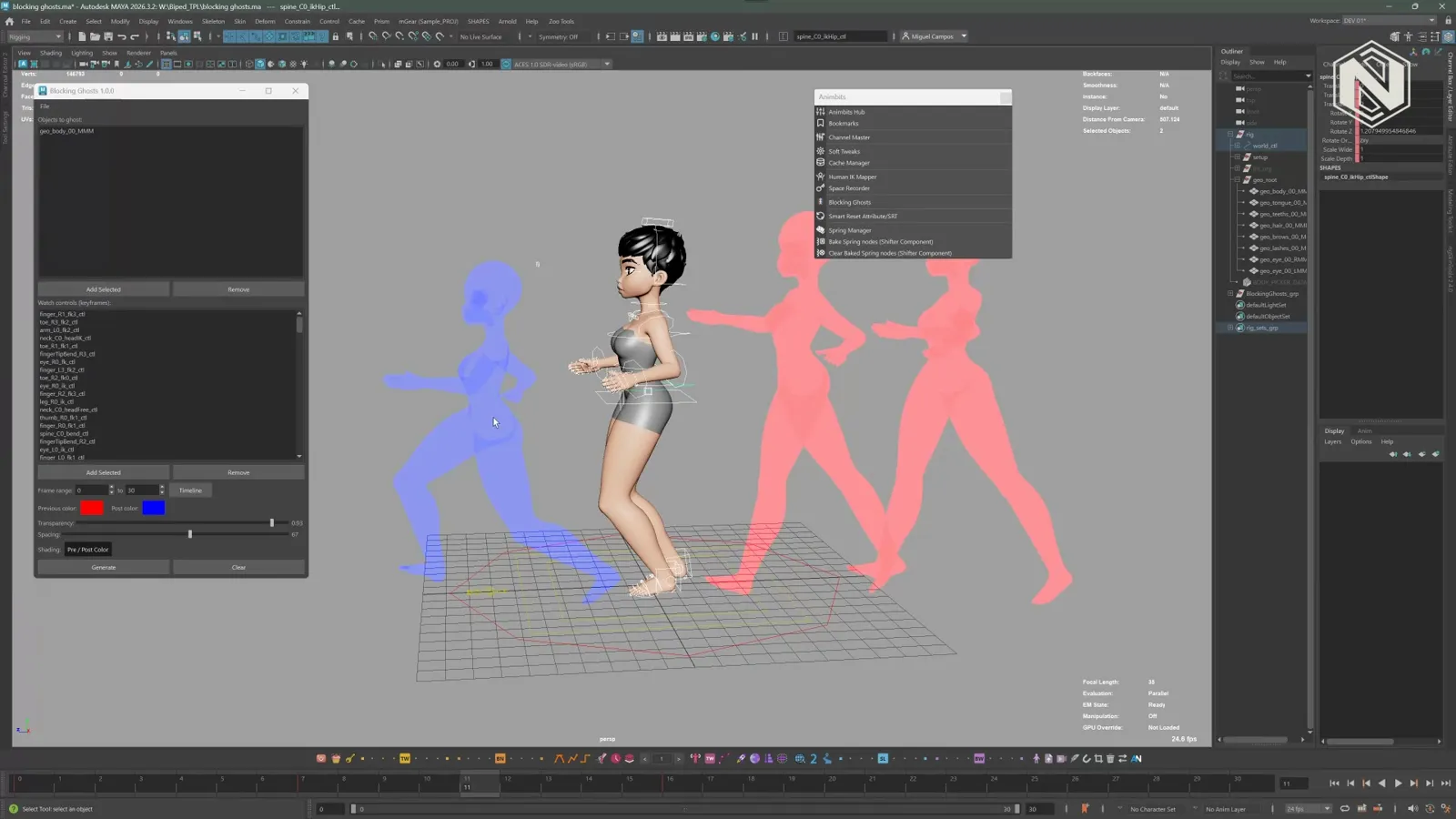
He also sped up the rigs, the builds and the tools. All of this is out now on mgear-framework.com.
What’s coming: the Rig Wizard and variants
Then he showed me something that isn’t even in the public repository yet.
The Rig Wizard walks you through a rig step by step, with instructions and checkboxes, and handles versioning and the data centric folder structure for you on a project basis. A supervisor would build wizards for a studio’s own characters, vehicles or anything else, and juniors follow them. Miquel plans to bundle one or two general ones, and points out that Advanced Skeleton takes a similar approach.
Variants let one guide hold many versions of a character: armour, no helmet, a space suit. You choose which components build in which variant, and turning off a parent turns off its children. Before, each variant needed its own guide.

Both are aimed at around the end of the year.
“This for me it’s been years thinking on this one.”
The industry, AI and uncertainty
Miquel works roughly 50/50 on games and animation, and sees uncertainty on both sides: game clients hit by studio closures, film projects delayed until a co-producer drops out. On AI, he doesn’t claim to know where it’s heading, but says this disruptive technology “is here to stay” and needs regulating. I agree. There’s too much happening at once to blame one thing, and I think we need a few years for it to settle.
mGear rigs on Animworks
If you want to try mGear without building a rig first, we have over 50 mGear rigs on Animworks, and many of them are free. One thing we see all the time: people download one, say it doesn’t work, and it turns out they haven’t installed mGear. Miquel wants to change that in future, so some components don’t need the custom nodes.
If you’re choosing software, my Blender vs Maya post covers why so many studios still rig and animate in Maya.
How to thank Miquel Campos
Questions go to the forum on mgear-framework.com, which Chris has moderated for years. The documentation is up to date, and Miquel takes it seriously. Studios that need help can contact him through the services page, because that is how mGear gets funded.
If your studio's using mGear day in, day out, maybe send Miquel a ping, just to tell him thank you.
Harvey Newman
Creators need that motivation, and it comes from hearing what difference the work makes to someone’s career or studio.
If mGear has saved you or your team time, say so in the comments on the video. I’m pretty sure Miquel will be reading.
The video
Watch the full breakdown
- 0:00Not the creator
- 2:59Jérémie Passerin's Gear
- 4:44Photography to animation
- 8:38Magnetic mocap suit
- 11:16Rigging in Maya
- 17:31Barcelona to Japan
- 20:14Nobody tells him
- 25:23Why mGear is free
- 28:33The industry and AI
- 37:10Shifter and the bits
- 41:49What mGear means
- 44:07Data centric rigging
- 56:22New animator tools
- 75:43The Rig Wizard
- 82:17How to thank him
Questions people ask
What is mGear?
mGear is a free, open source rigging framework for Maya. Most people know it through Shifter, its modular rigging system, but it also includes Simple Rig for props, the Rigbits, Animbits, CFXbits and Utilbits toolsets, Crank, Flex and ueGear for Unreal Engine.
Is mGear free?
Yes. It is released under the MIT licence and downloaded from GitHub with no registration. It doesn't take donations. The website points people who want to give something to Médecins du Monde instead, and funds development through rigging and pipeline services.
Who created mGear?
Jérémie Passerin created the original Gear for Softimage. Miquel Campos took over the Maya version around 2013, asked Jérémie to change the licence, and has developed it ever since with help from community contributors.
What does mGear stand for?
The m is for Maya. Gear is an acronym Jérémie Passerin came up with: Get Everything Animation and Rigging. Miquel says he didn't know that for years.
Does mGear work with Unreal Engine?
ueGear connects Maya and Unreal and its workflow tools are staying. The Unreal rigging system built for it is on hold because studios didn't adopt it. Miquel wants future rigging modules to use Unreal's default system.
And remember,
there are no shortcuts for animation.
 Stay well, stay safe,Harvey NewmanBook a free call →
 Looking for knowledge?How to Thrive in the Games Industry: The Long GameMy book on building a career in games and keeping it. CRC Press, 246 pages.Get the book →
 Looking for resources?Rigs, courses and mentors on AnimworksFree and paid rigs, courses from working pros, one to one mentoring and mocap packs.Visit anim.works →
 The Game Animation Pipeline: How I Build One, AAA or Indie12 Jun 2026
 Blender Funding: Only 1 in 200 Users Pays Anything11 Sept 2026
 Maya 2027: The Sequencer Update Maya Animation Needed8 May 2026
 Mastering Motion Capture for Games: Advanced Techniques and Tools From AAA12 Nov 2024